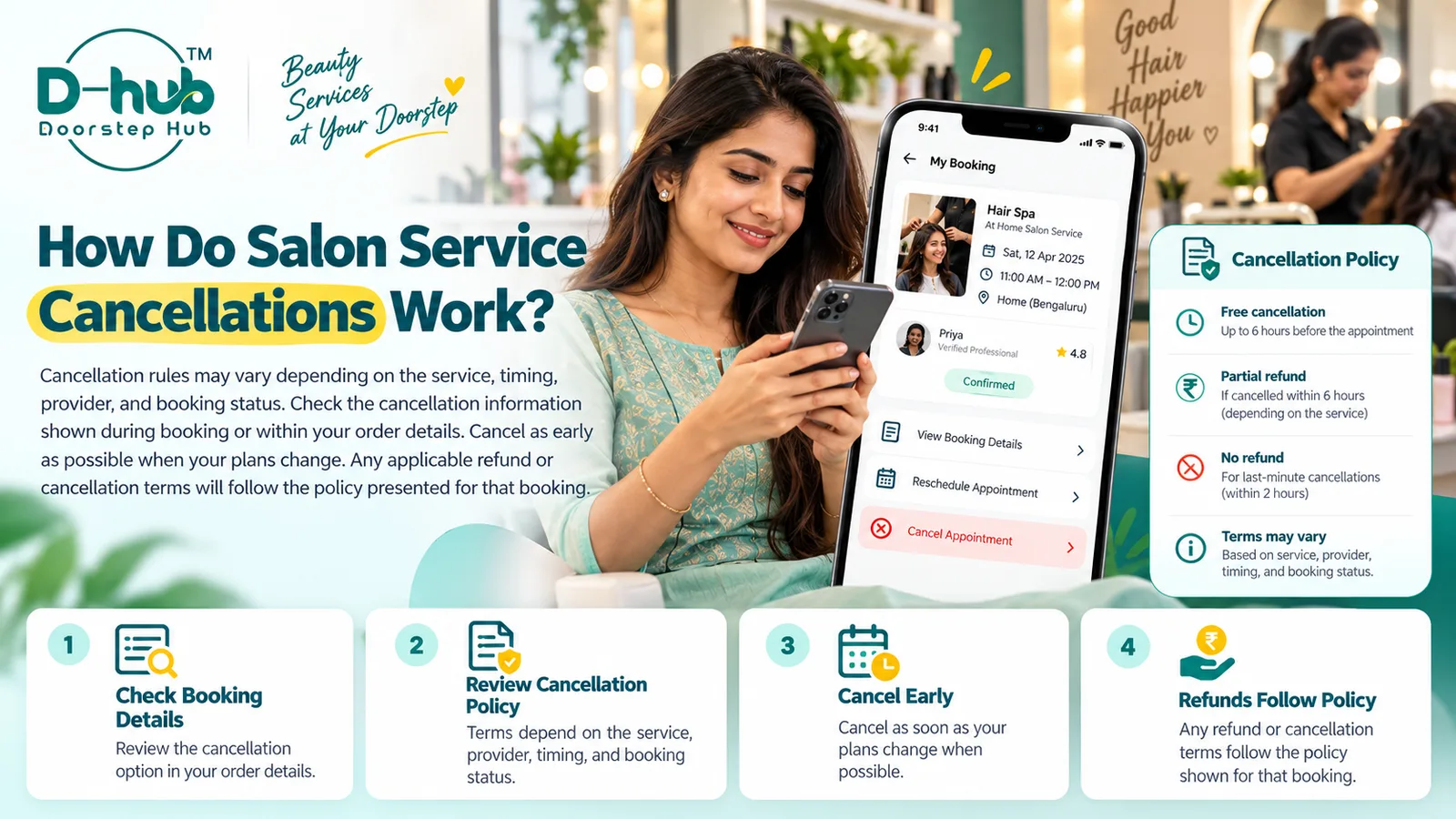
Sometimes plans change and you may need to cancel a salon or beauty service booking. Cancellation availability and any related conditions can vary depending on the selected service, provider, appointment timing, and current booking status.
With Doorstep Hub, review the cancellation information shown during booking or within your booking details before cancelling.
1. Open Your Booking Details
Sign in to your Doorstep Hub account and open the section where your salon or beauty service bookings are displayed.
Select the booking you want to cancel and review information such as:
- Service name
- Provider
- Appointment date
- Appointment time
- Booking status
- Cancellation option where available
- Applicable cancellation information
Make sure you are viewing the correct booking before making any changes.
2. Check Whether Cancellation Is Available
Cancellation options may depend on the current booking status.
For example, cancellation may be available for some upcoming bookings but unavailable once the service has started, been completed, or reached another restricted stage.
If a cancellation option is shown in your booking details, review the information carefully before proceeding.
3. Review the Cancellation Terms
Before cancelling, check any conditions associated with the booking.
These may depend on:
- Service type
- Provider
- Appointment timing
- Booking status
- How close the cancellation is to the appointment
- Any policy shown during booking
Do not assume that every salon or beauty service has the same cancellation conditions.
4. Cancel as Early as Possible
If you know that you cannot attend your appointment, cancel as early as reasonably possible.
Early cancellation can help:
- Keep provider schedules accurate
- Make the appointment slot available to others
- Reduce last-minute confusion
- Give you more time to review alternative options
- Help you understand any applicable cancellation terms
Waiting until very close to the appointment may affect the options available to you.
5. Check the Booking Timing
The timing of your cancellation may affect the applicable terms.
Some bookings may have different conditions depending on whether you cancel:
- Well before the appointment
- On the same day
- Shortly before the scheduled time
- After the appointment has already started
Review the specific information shown for your booking rather than relying on general assumptions.
6. Review Any Applicable Refund Information
If payment has already been made, check whether refund information is shown for the booking.
Any applicable refund will depend on the policy presented for that particular service or booking.
Review details such as:
- Whether a refund applies
- Whether any cancellation amount may be deducted
- How the refund may be processed
- Whether different timing rules apply
The exact terms can vary, so rely on the information shown for your booking.
7. Do Not Assume a Full Refund Applies
Cancelling a booking does not automatically mean that the full amount will always be refunded.
Refund eligibility may depend on:
- Cancellation timing
- Service conditions
- Provider terms
- Booking status
- Applicable platform policy
Check the displayed cancellation or refund information before confirming.
8. Confirm the Cancellation
If cancellation is available and you decide to proceed, follow the on-screen instructions until the process is complete.
After cancelling, review the booking again and confirm that the status has been updated.
Where supported, the status may show that the booking has been cancelled.
9. Check for Cancellation Confirmation
Where available, you may receive confirmation through:
- Your Doorstep Hub account
- App notification
- SMS
- Another supported notification channel
Keep the confirmation until you are satisfied that the booking has been successfully cancelled and any related process is complete.
10. Avoid Assuming the Booking Is Cancelled Too Early
Selecting the cancellation option may not always complete the process immediately if additional confirmation is required.
Make sure you finish all required steps.
If the booking still appears active, review the details or contact support where necessary.
11. Consider Rescheduling Instead
If you still want the service but cannot attend at the original time, check whether rescheduling is available before cancelling.
Rescheduling may be useful if:
- Your schedule has changed
- Another appointment time is available
- You still need the same service
- The provider can accommodate a different slot
Cancellation and rescheduling may have different conditions, so review both options where available.
12. Contact Doorstep Hub Support if Needed
If you cannot find a cancellation option or the booking information is unclear, contact Doorstep Hub Support.
Keep useful information ready, such as:
- Booking reference
- Service name
- Provider
- Appointment date
- Appointment time
- Current booking status
Support can help you understand the options available for your booking.
13. Keep Refund and Cancellation Records Where Relevant
If a cancellation involves a payment or refund, keep any appropriate records until the process is complete.
This may include:
- Booking confirmation
- Cancellation confirmation
- Payment details
- Refund information
- Relevant support communication
Do not share passwords, OTPs, PINs, or other sensitive authentication information when requesting assistance.
Why Reviewing Cancellation Terms Matters
Cancellation conditions can vary from one booking to another.
Checking the specific terms can help you:
- Understand whether cancellation is available
- Know whether timing affects the outcome
- Review any applicable refund terms
- Avoid misunderstandings
- Decide whether rescheduling may be a better option
- Keep your booking status accurate
The most reliable information is the cancellation policy shown for the specific service or booking.
Cancel Salon & Beauty Bookings Carefully with Doorstep Hub
When cancelling a salon or beauty service through Doorstep Hub, review the cancellation information shown during booking or within your booking details.
Cancel as early as possible when your plans change.
Any applicable cancellation or refund terms will follow the policy presented for that particular booking and may vary based on the service, provider, timing, and booking status.
Need Help with Your Doorstep Hub Booking?
📞 Helpline: 8886688666
🌐 Website: doorstephub.com
📲 Download the Doorstep Hub App
Review your booking conditions carefully before cancelling so you understand the options and terms that apply.
Frequently Asked Questions
Common troubleshooting questions answered by our specialists
Was this article helpful?
Your feedback helps us improve our repair guides and service tips.